The Unscrambler® - Technical FAQs

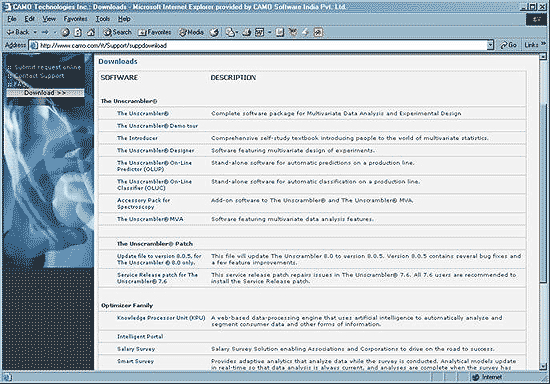
How to download Unscrambler?

  1. Open the CAMO website www.camo.com and go to support downloads.

    D02
  2. You will be able to view all the products.


    The Unscrambler®
    Optimizer Family
    Miscellaneous
    (by clicking on these topics it should lead them to that topic in the downloads page)

  3. For example, let us choose the first topic ‘The Unscrambler®’ and it takes us to the 30 day trial version download with the fill up form.

    D03
  4. The fields that are marked in red are mandatory fields and have to be filled completely.

  5. By filling the relevant information in the fields given will lead to The Unscrambler download.

  6. Click on .

    D04
  7. Follow the instructions given. Save it in a file. The unlock key will be sent through the email address.

    D05

[ BACK | TOP ]


How to install the downloaded version of Unscrambler
?

Following is the procedure for installing Unscrambler.

  1. Extract the zip file into a temporary directory (Say C:\UnscTemp)

    D06
  2. Now open Disk1 folder and double click on setup.exe.

  3. Follow the instructions of wizard.

    D07
  4. The unlock key will be sent through the email address.

    D08
  5. Copy the unlock key number and paste it in the installation page without any space.

    D09
  6. When the installation is complete you can remove the Unscrambler® files from temp directory.

    D10

    D11

    D12

    D13

Following may be the reasons for given error.

  1. Client did not unzip the file in some temp folder, instead he is double clicking setup.exe file directly from WinZip.
  2. Client does not have Administrator permission on his machine.
  3. Client does not have write access of registry.
  4. Client had installed the Unscrambler on unsupported Operating System (Current version of Unscrambler supports Windows 98, NT 4.0, 2000, XP and 2003).


[ BACK | TOP ]